Matematika v Python
Mathematics in Python
Úvod
Python je interpretovaný, interaktívny programovací jazyk, ktorý vytvoril Guido van Rossum v 1991. V súčasnosti je Python najobľúbenejší a najpoužívanejší programovací jazyk pre matematické výpočty. Python sa používa nie len pre vedecké výpočty, ale je rozšírený medzi programátormi aj pre in účely. Python teda patrí medzi najobľúbenejšie programovacie jazyky na celom svete.
Nespornou výhodou tohto jazyka je:
- open source programovací jazyk,
- veľká komunita,
- intuitívna syntax (intuitívne písanie príkazov),
- veľké množstvo open source knižníc, modulov,
- čitateľnejší kód, úspornejší kód,
- a iné.
Inštalácia
Python sa dá stiahnuť (v download) a nainštalovať do pc na stránke: www.python.org. Dôležité je si vybrať správnu verziu pre operačný systém, v niektorých prípadoch je dôležitá aj verzia programu z dôvodu kompatibility pri programovaní (viac modulov, atď.).
Po stiahnutí jednoducho aktivujeme inštalačný súbor Pythonu, čím sa nám Python nainštaluje do pc. Pri inštalácii je dôležité odškrtnúť voľby: Add Python version to PATH.
Programátori používajú tzv. virtuálne prostredie, teda majú nainštalovaných viac verzii Pythonu pre konkrétny projekt. To sa robí hlavne preto, že na virtuálnej verzii je možné si nastaviť iné knižnice, moduly. Teda presne tie ktoré budú potrebovať pri programovaní. Postu inštalácie virtuálneho prostredia je možné nájsť na internete (nejaký videotutorial).
Spustenie a práca s Python
Po inštalácií sa nám pridá Python do ponuky štart (Windows). Otvoriť môžeme Python aj cez príkazový riadok spustením cmd.
Ak neviete nájsť cmd (príkazový riadok vo windows), dajte hľadať "cmd", resp. stlačte klávesu windovs+r.
Potom v príkazovom riadku napíšte : python
Informácia o verzii: python --version (nezabudnite na medzeru medzi python a pomlčka)
ukončenie python v cmd: quit()
príkaz v cmd: cls - vymaže obrazovku ak je zaplnená informáciami.
spustenie editora Python:
V inštalácii je aj jednoduchý editor kódu s názvom: IDLE () - nájdete v ponuke štart. Tento jednoduchý editor slúži na písanie kódu, ktorý následne môžete spustiť.
Pre lepšiu prácu s Python pri zložitejšom kóde je však dobré, nutné použiť lepší editor ako je napr. Visual Studio Code (https://code.visualstudio.com/). Tento program (vývojové prostredie) umožňuje lepšiu prácu s Python kódom a nie len to. Pre inštaláciu a nastavenie Visual Studio Code si pozrite tutorial na internete.
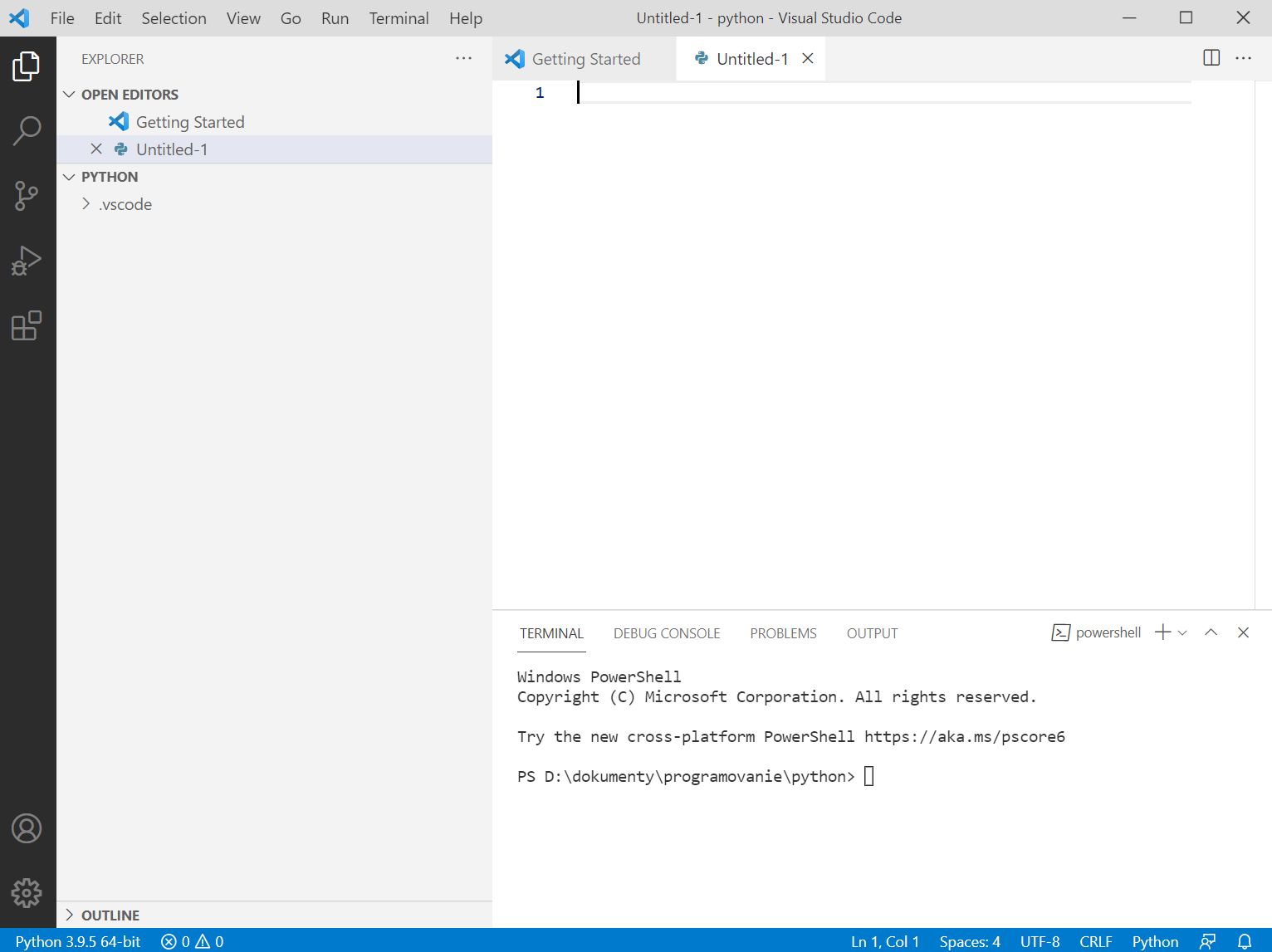
Obr. 1 Vývojové prostredie Visual Code.
Knižnice pre matematiku v Pythone
Existuje naozaj veľa vytvorených knižníc, modulov pre matematiku, resp. pri programovaní kde je potrebné využiť matematiku. Základné už vstavané funkcie po inštalácii sa inicializujú pomocou načítania zadaním napr. v cmd:
python
import math
následné volanie funkcii je v tvare math.
príklad:
math.pi : vypíše pi
math.cos(math.pi)
atď.
Python vie pracovať aj s komplexnými číslami.
Zoznam tých základných funkcii je : https://docs.python.org/3/library/math.html
Ďalšou výhodou oproti iným jazykom napr. c++, visual basic atď. je to, že Python rovno vie pracovať s naozaj veľkými číslami. Nie je potrebné si vytvárať programy na prácu s veľkými číslami. Toto je u Python už implementované.
Príklad:
2**1546 (** - je mocnina čísla)
výsledok potom Python vyhodí:
246815992516713737070603940457299365162198348589638548619230724000282356899000
647748514306468592235485537153667162931690277111498628603732476888369960015324
309013845952678423016528084778770585566908983617268512773897968215849430948808
846041302989615615776321673451589389258071580837624669367722390301273125925782
436784291014968753357984026465288251349795932261756404969828008615032987142533
6190336186634758396920666008274914316826463564186862578541572874587460337664
Zaujímavé knižnice:
Spomeniem len niektoré lebo ich je veľa. Napríklad sa zíde, keď budeme vedieť nejak inteligentne vygenerovať graf nejakých hodnôt. Na to poslúži knižnica matplotlib.
Najskôr teda nainštalujeme knižnicu, ktorú samozrejme niekto naprogramoval (tretia strana).
1. otvoríme cmd, napíšeme: pip install matplotlib
2. prebehne inštalácia
3. inicializácia knižnice: import matplotlib
4. ak by sme chceli z knižnice iba niektoré funkcie, modul tak importujeme napr. import matplotlib.pyplot (čo je podknižnica pre vykreslenie hodnôt do grafov)
Príklad:
import matplotlib.pyplot As plt # vytvorili sme aj skratku pre názov knižnice, môžeme ju vyvolať skratkou.
# pole čísiel
x=[12,5,4,8,7,6,4.3,9,15,45,7,3.2]
# vytvorenie tohto grafu
plt.plot(x)
# vykreslenie tohto grafu
plt.show()
debug programu vo visual code (pravé tlačítko myšky) cez Run Phyton File in terminal,
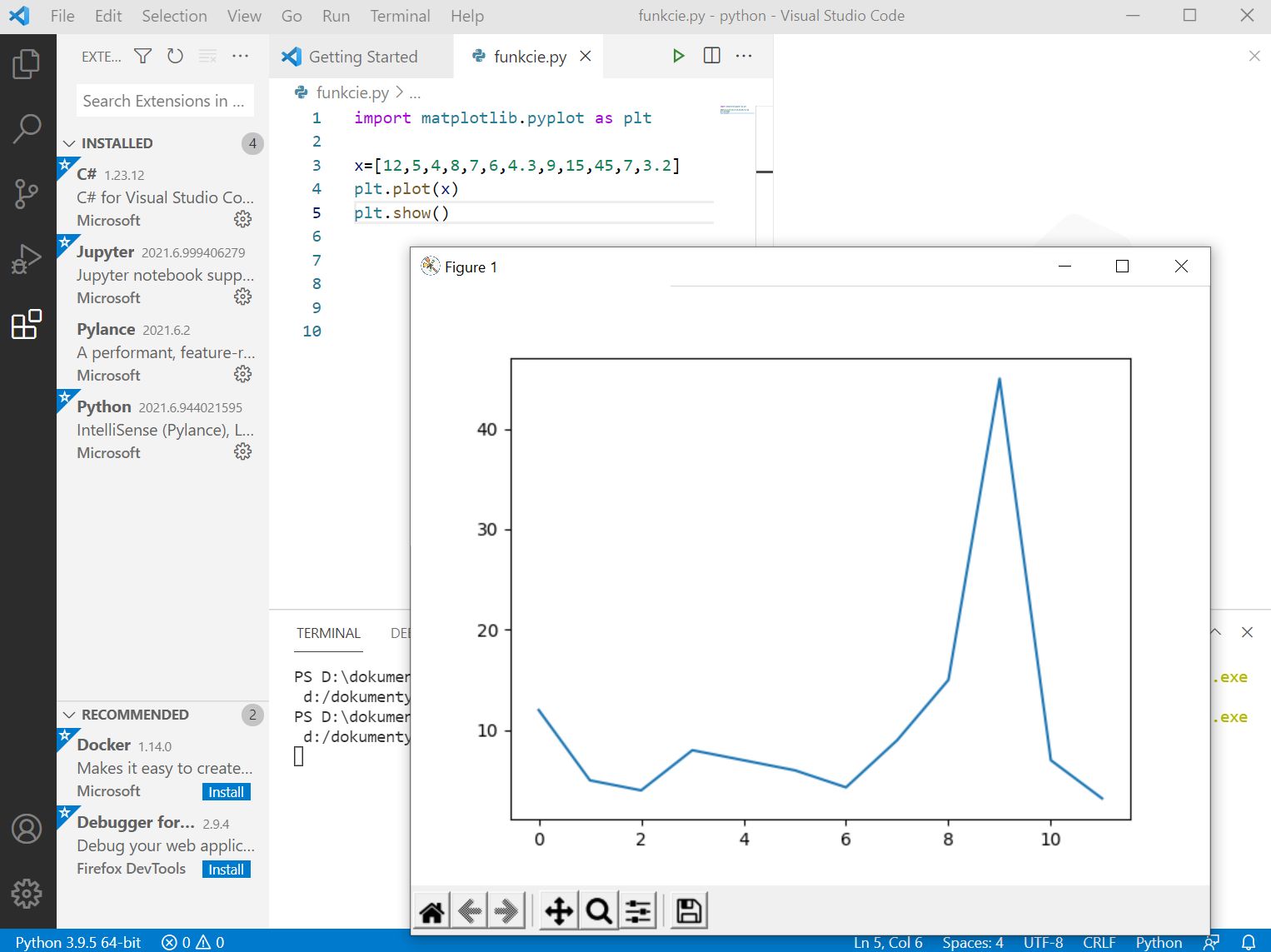
Obr. 2 ukážka knižnice matplotlib, zdroj: vlastný obrázok.
Dátová analýza
Pre účely dátovej analýzy sú veľmi dobré knižnice Jupyter Lab, Jupyter Notebook. Táto knižnica je obsiahla a používaná, viac na stránke:
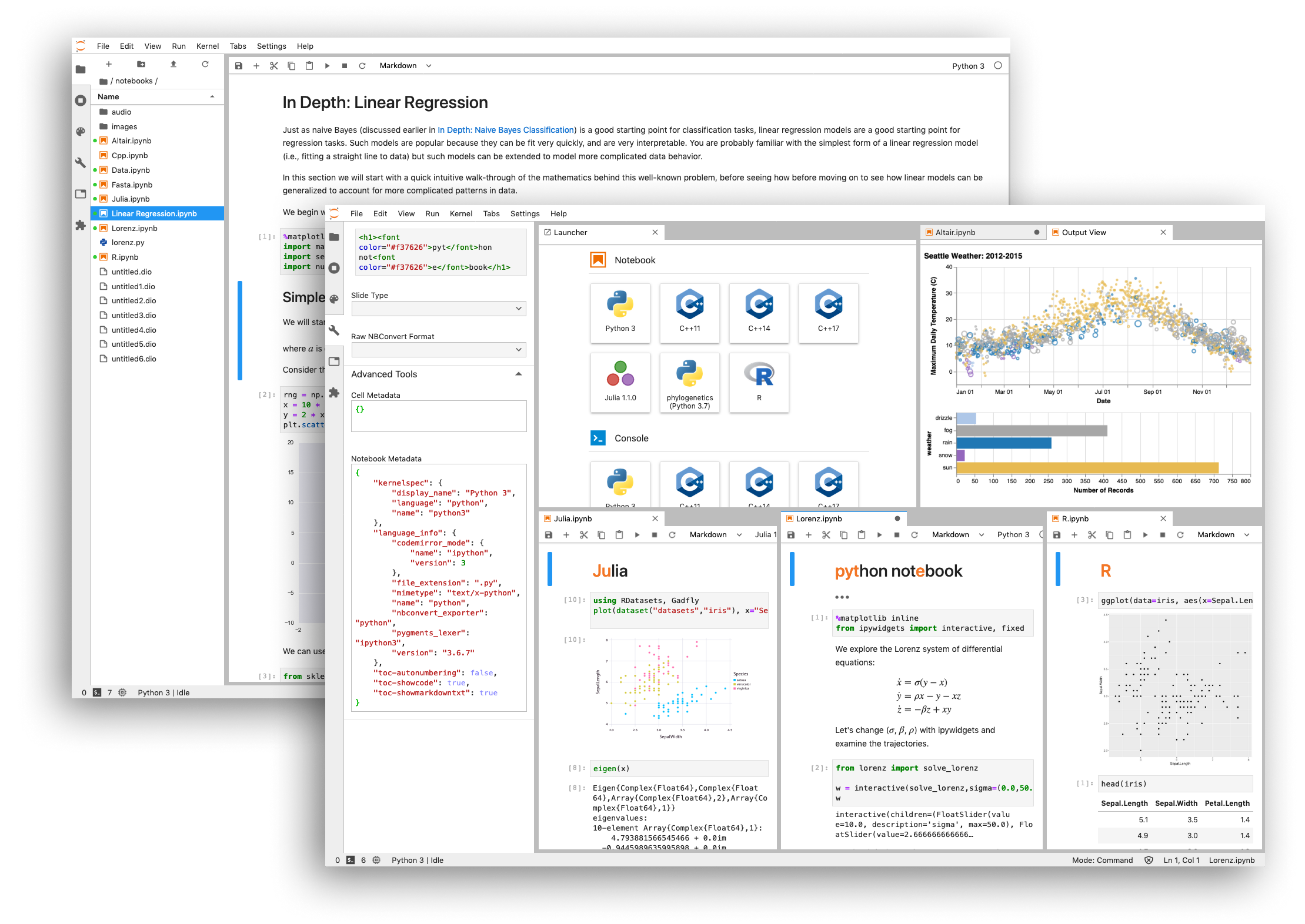
Obr.3 Ukážka, zdroj: jupyter.org
Introduction
Python is an interpreted, interactive programming language created by Guido van Rossum in 1991. Currently, Python is the most popular and most used programming language for mathematical calculations. Python is used not only for scientific calculations, but is widespread among programmers for other purposes as well. Python is therefore among the most popular programming languages worldwide.
Undeniable advantages of this language are:
- open source programming language,
- large community,
- intuitive syntax (intuitive command writing),
- large number of open source libraries, modules,
- more readable code, more economical code,
- and others.
Installation
Python can be downloaded and installed on PC at: www.python.org. It is important to choose the correct version for your operating system, in some cases the program version is also important due to compatibility in programming (more modules, etc.).
After downloading, simply activate the Python installation file, which will install Python on your PC. During installation, it is important to check the options: Add Python version to PATH.
Programmers use so-called virtual environments, i.e., they have multiple versions of Python installed for a specific project. This is mainly done because on a virtual version it is possible to set up different libraries, modules. Exactly those that will be needed for programming. Steps for installing virtual environment can be found on the internet (some video tutorial).
Running and Working with Python
After installation, Python is added to the start menu (Windows). We can also open Python through command prompt by running cmd.
If you can't find cmd (command prompt in Windows), search for "cmd", or press Windows+R key.
Then in command prompt write: python
Version information: python --version (don't forget the space between python and dash)
exit python in cmd: quit()
command in cmd: cls - clears screen if it's filled with information.
running Python editor:
The installation also includes a simple code editor named: IDLE () - you'll find it in the start menu. This simple editor is used for writing code, which you can then run.
For better work with Python with more complex code, however, it is good, necessary to use a better editor such as Visual Studio Code (https://code.visualstudio.com/). This program (development environment) allows better work with Python code and not only that. For installation and setup of Visual Studio Code, see tutorial on the internet.
Fig. 1 Visual Code development environment.
Libraries for Mathematics in Python
There are really many created libraries, modules for mathematics, or in programming where it is necessary to use mathematics. Basic built-in functions after installation are initialized by loading, for example in cmd:
python
import math
subsequent function calling is in the form math.
example:
math.pi : prints pi
math.cos(math.pi)
etc.
Python can also work with complex numbers.
List of those basic functions is: https://docs.python.org/3/library/math.html
Another advantage over other languages like C++, Visual Basic, etc. is that Python can directly work with really large numbers. There is no need to create programs for working with large numbers. This is already implemented in Python.
Example:
2**1546 (** - is power of number)
then Python outputs the result:
246815992516713737070603940457299365162198348589638548619230724000282356899000
647748514306468592235485537153667162931690277111498628603732476888369960015324
309013845952678423016528084778770585566908983617268512773897968215849430948808
846041302989615615776321673451589389258071580837624669367722390301273125925782
436784291014968753357984026465288251349795932261756404969828008615032987142533
6190336186634758396920666008274914316826463564186862578541572874587460337664
Interesting Libraries:
I'll mention only some because there are many. For example, it's useful when we need to intelligently generate a graph of some values. The matplotlib library serves for this.
First, we install the library, which of course someone programmed (third party).
1. open cmd, write: pip install matplotlib
2. installation proceeds
3. library initialization: import matplotlib
4. if we wanted only some functions from the library, module, we import e.g., import matplotlib.pyplot (which is a sub-library for drawing values into graphs)
Example:
import matplotlib.pyplot as plt # we also created a shortcut for the library name, we can call it with the shortcut.
# array of numbers
x=[12,5,4,8,7,6,4.3,9,15,45,7,3.2]
# creating this graph
plt.plot(x)
# drawing this graph
plt.show()
debug program in visual code (right mouse button) via Run Python File in terminal,
Fig. 2 matplotlib library example, source: own image.
Data Analysis
For data analysis purposes, Jupyter Lab, Jupyter Notebook libraries are very good. This library is comprehensive and used, more at the page:
Fig. 3 Example, source: jupyter.org